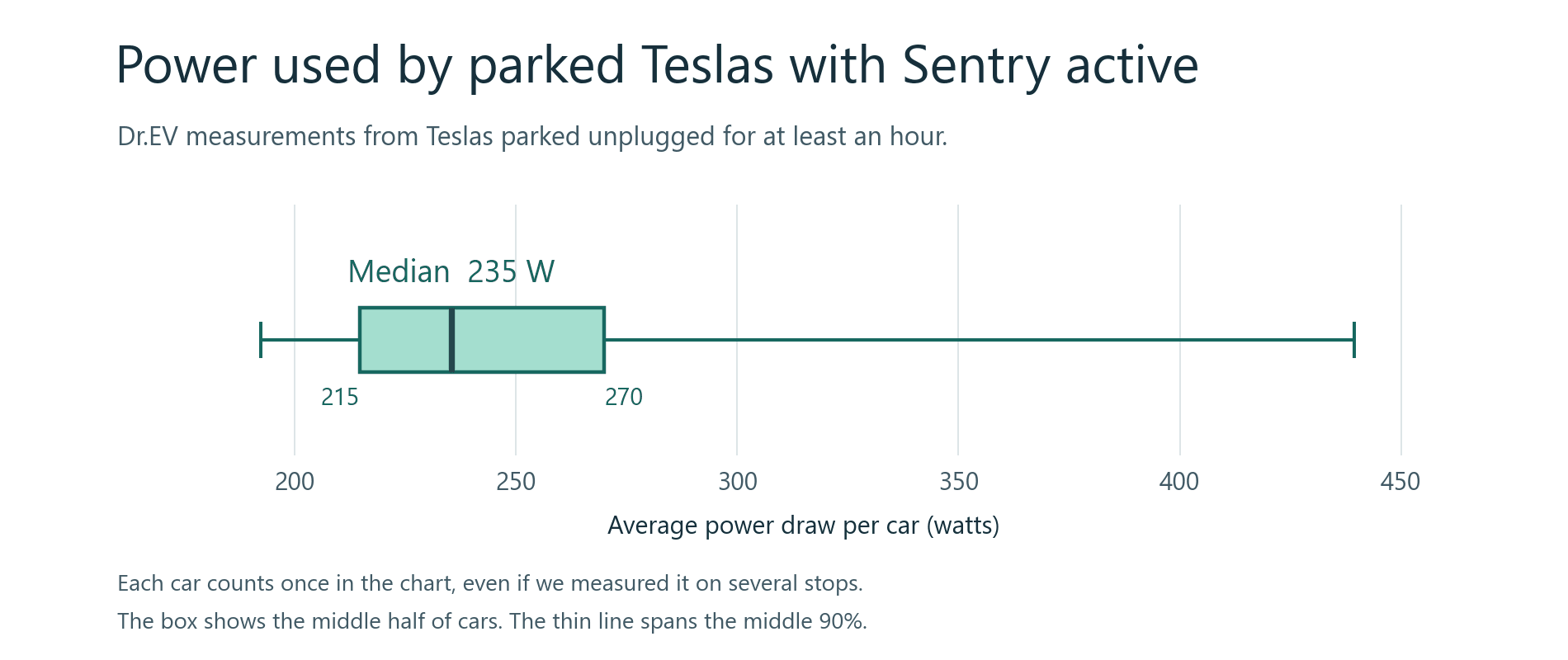
The parked Teslas we measured drew a median of 235 watts with Sentry Mode active. At that rate, a 12-hour stay would use about 2.8 kWh. If your battery holds 75 kWh of usable energy, that’s just under 4% of a full charge.
Sentry keeps the cameras ready to record when your Tesla is parked and locked. We measured power at the battery, so the figure includes anything else the car was running, such as the heater or air conditioner. Tesla’s guide to Sentry Mode
How we measured battery use while parked
A stop counted if the car stayed parked and unplugged for at least an hour. Sentry had to report Armed, Aware, Panic, or Quiet within five minutes of the first battery reading and again within five minutes of the last. We left out stops with conflicting Sentry readings or long gaps in the battery data. Tesla’s telemetry field definitions
For each car, we divided the energy it used by the hours it spent parked during those stops. Half the cars averaged between 215 and 270 watts. The longest stop lasted just over 65 hours, and that car used 16 kWh.

Tesla also reports a state called Idle. Including time marked Idle brought the median to 245 watts. Most of those hours were still spent in an active state. We didn’t have the driver’s on/off setting, and hours could pass between Idle readings. That left us without a reliable figure for an hour spent entirely in Idle. Tesla’s list of Sentry states
At what battery percentage does Sentry Mode turn off?
On a U.S. Model Y, check Controls > Charging > Low Power Mode. The default is 20%. You can choose a battery level between 10% and 20%. When Low Power Mode starts, Sentry turns off. The car still uses some battery power while parked. Tesla’s Low Power Mode settings
Say you park at the airport at 6 p.m. with 25% showing on the screen. With a 75 kWh usable battery and Low Power Mode set to 20%, you have about 3.75 kWh before Sentry turns off. At 235 watts, that would last about 16 hours. You could reach 20% around 10 a.m. the next day.
If you need most of your remaining charge to get home or reach a charger, turn Sentry off when you park. When you get back to your Model Y, open the Energy app before driving away. Under Park, choose Since Last Drive to see how much battery your own car used while you were away. If it used more than you expected, check for other causes of parked battery drain.